Web Languages:
- Html
- CSS
- JS
HTML
What : HTML is the universal markup language for the Web.
Why: HTML lets you format text, add graphics, create links, input forms, frames and tables, etc., and save it all in a text file that any browser can read and display. It helps you to make the structure of your web page
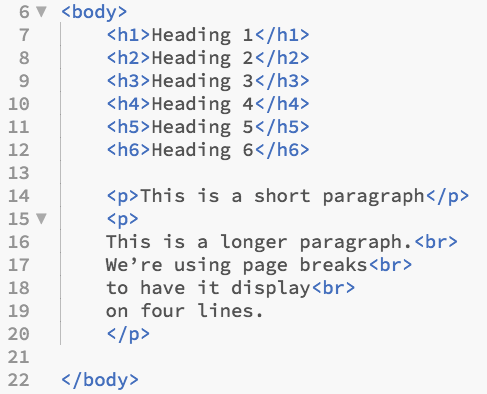
How: by using tags (there are many sets of tags that are provided on the Html but first let us be familiar with
CSS
What : Cascading Style Sheets.
Why: It is a language designed to specify the overall appearance of webpages as well as the appearance and structure of the text and elements such as images and buttons on webpages and their layout.
How: There are three ways to add css to the webpages 1. inner 2. extrenal 3. internal
selector{

proparity; value;

}

J.S
What : is a multi-paradigm, dynamic language with types and operators, standard built-in objects, and methods.
Why: to make it lively and to mske it functional
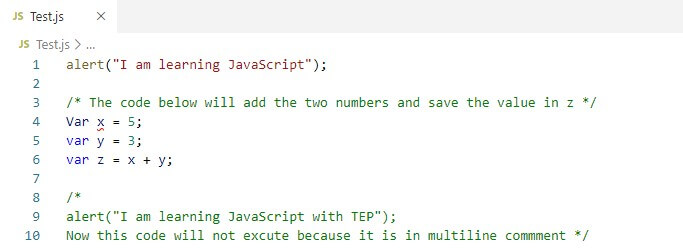
How:by using its syntax * JavaScript syntax is the set of rules, how JavaScript programs are constructed: // How to create variables: var x; let y;
// How to use variables:
x = 5;
y = 6;
let z = x + y;
Maps for creating a webpage:

Dictionary for HTML:
<!--...--The HTML ‘comments’ tag is used for creating comments within your HTML code.!doctype The HTML!doctype tag is used for specifying which version of HTML the document is using. This is referred to as the document type declaration (DTD).-
aThe HTML a tag is used for creating a hyperlink to either another document, or somewhere within the current document. blockquoteThe HTML blockquote tag is used for indicating long quotations (i.e. quotations that span multiple lines).bodyThe HTML body tag is used for indicating the main content section of the HTML document. The body tag is placed between the </head> and the </html> tags.brThe HTML br tag is used for specifying a line break.codeThe HTML code tag is used for indicating a piece of code. The code tag surrounds the code being marked up.dlThe HTML dl tag is used for declaring a definition list.dtThe HTML dt tag is used for specifying a definition term in a definition list.h1The HTML h1 tag is used for specifying level 1 headings. There are 6 levels of headings (h1 - h6) with h1 the most important and h6 the least important.liThe HTML li tag is used for specifying a list item in ordered, unordered, directory, and menu lists.linkThe HTML link tag is used for defining a link to an external document. It is placed in in the <head> section of the document.