Chapters:
- Chapter 4: “Links”
- Chapter 14: “layout” (pp.300-329)
- Chapter2 :Functions, Methods, and Object
- The Article:
Chapter 3: “Links”
- Creating links between pages
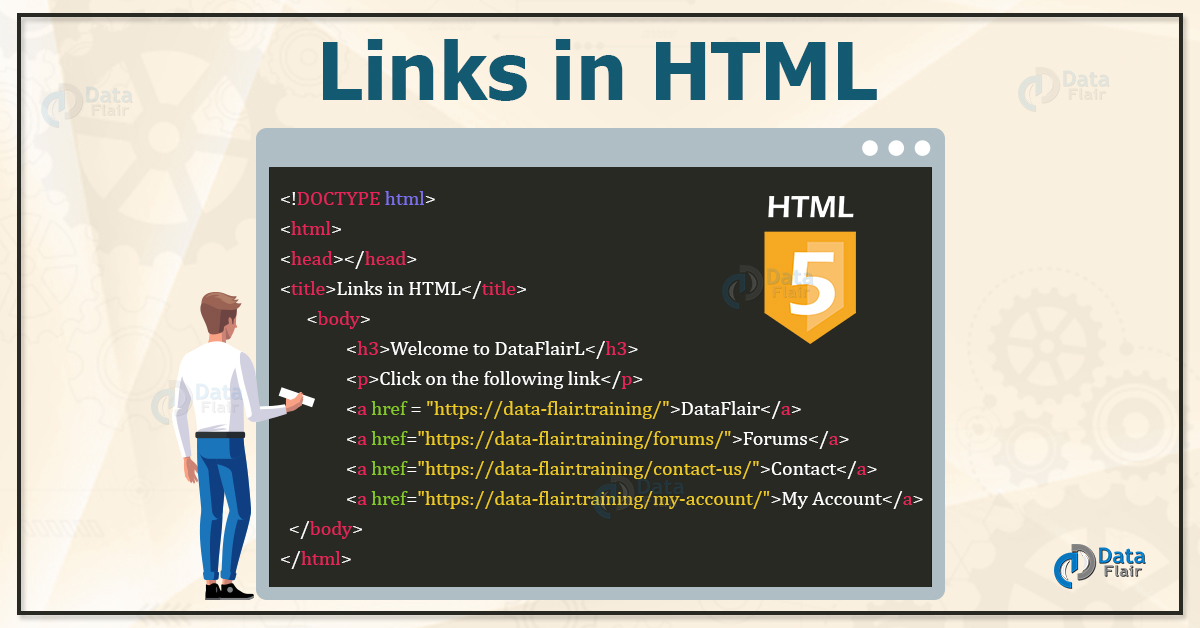
- WHAT: They are links to like between one page to other or from one patr to different one .Also you can see a linke the will open the new browser.
- WHY : To show other contenent in another tab
- HOW :
<a=href="the link">The word</a>
- link Emails
<a href = "mailto: abc@example.com">Send Email</a>
This code will generate the following link which you can use to send email.
Send Email Now, if a user clicks this link, it launches one Email Client (like Lotus Notes, Outlook Express etc. ) installed on your user’s computer. There is another risk to use this option to send email because if user do not have email client installed on their computer then it would not be possible to send email.
- open links in new taps
-
It’s easy to use HTML to open a link in a new tab. You just need an anchor () element with three important attributes:
- The href attribute set to the URL of the page you want to link to
- The target attribute set to _blank, which tells the browser to open the link in a new tab/window, depending on the browser’s settings
- The rel attribute set to noreferrer noopener to prevent possible malicious attacks from the pages you link to Again, here’s the working example HTML:
-
<p>Check out <a href="https://www.freecodecamp.org/" target="_blank" rel="noopener noreferrer">freeCodeCamp</a>.</p>
2. Chapter 15: “Layout”
- controlling position of layout
- Using CSS, you can layout all your elements on your webpage visually. For example, you can position an element at the very top of your page, or 50px below the element before it.
To control just how an element will appear in the layout, you need to use the CSS position property. In addition, you can utilize some other position-related properties: top, right, bottom, left, and z-index. (We’ll get more into those later on.)
The position property can take five different values: static,relative, absolute, fixed, and sticky.
-
- Static Position: static is the default value that an element will have. This means if you don’t declare position for an element in CSS, it will automatically be set to static.
-
- Relative Position: relative is similar to static in that relatively positioned elements will follow the normal flow of the webpage. But the main difference is that using relative will now unlock the other CSS layout properties.
-
- Absolute Position: absolute will cause an element to be taken out of that normal flow of the webpage.
-
- Fixed Position: fixed will take the element out of the normal flow, and also position it in the same place in the viewport (what’s visible on screen). This means that scrolling will not affect its position at all.
-
- Sticky Position: sticky elements will initially behave like position: relative elements, but if you keep scrolling, they will get taken out of the normal flow and behave like position: fixed wherever you have positioned them.
Functions, Methods, and Object
-
Objects :
- used to represent a “thing” in your code. That could be a person, a car, a building, a book, a character in a game — basically anything that is made up or can be defined by a set of characteristics. In objects, these characteristics are called properties that consist of a key and a value.
` // Basic object syntax var object =
{
key: ‘value’ } ; // Example ‘person’ object var person = { name: ‘Zac’, age: 33, likesCoding: true }; `
- used to represent a “thing” in your code. That could be a person, a car, a building, a book, a character in a game — basically anything that is made up or can be defined by a set of characteristics. In objects, these characteristics are called properties that consist of a key and a value.
- Access, Add, and Remove Items from Objects Properties in objects can be accessed, added, changed, and removed by using either dot or bracket notation.
- Arrays
When to Use Arrays :
We use arrays whenever we want to create and store a list of multiple items in a single variable. Arrays are especially useful when creating ordered collections where items in the collection can be accessed by their numerical position in the list. Just as object properties can store values of any primitive data type (as well as an array or another object), so too can arrays consist of strings, numbers, booleans, objects, or even other arrays.
Access, Add, and Remove Items from Arrays Arrays use zero-based indexing, so the first item in an array has an index of 0

Pair programming
consists of two programmers sharing a single workstation (one screen, keyboard and mouse among the pair). The programmer at the keyboard is usually called the “driver”, the other, also actively involved in the programming task but focusing more on overall direction is the “navigator”; it is expected that the programmers swap roles every few minutes or so.
Reasons for pair programming:
- help you to be more effective
- challange you
- it helps you in your social life
- it is effective with job interviews
- learning from a partner