Chapters
Chapter 6: Tables in HTML:
*What is a table ?
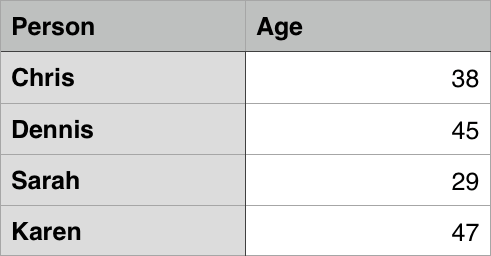
A table is a structured set of data made up of rows and columns (tabular data). A table allows you to quickly and easily look up values that indicate some kind of connection between different types of data, for example a person and their age, or a day of the week, or the timetable for a local swimming pool.
A sample table showing names and ages of some people - Chris 38, Dennis 45, Sarah 29, Karen 47.
A swimming timetable showing a sample data table
Tables are very commonly used in human society, and have been for a long time, as evidenced by this US Census document from 1800:
A very old parchment document; the data is not easily readable, but it clearly shows a data table being used.
It is therefore no wonder that the creators of HTML provided a means by which to structure and present tabular data on the web.
How does a table work?
The point of a table is that it is rigid. Information is easily interpreted by making visual associations between row and column headers. Look at the table below for example and find a Jovian gas giant with 62 moons. You can find the answer by associating the relevant row and column headers.
Using tables for layout rather than CSS layout techniques is a bad idea. The main reasons are as follows:
- Layout tables reduce accessibility for visually impaired users: Screenreaders, used by blind people, interpret the tags that exist in an HTML page and read out the contents to the user. Because tables are not the right tool for layout, and the markup is more complex than with CSS layout techniques, the screenreaders’ output will be confusing to their users.
- Tables produce tag soup: As mentioned above, table layouts generally involve more complex markup structures than proper layout techniques. This can result in the code being harder to write, maintain, and debug.
- Tables are not automatically responsive: When you use proper layout containers (such as
<header>, <section>, <article>, or <div>), their width defaults to 100% of their parent element. Tables on the other hand are sized according to their content by default, so extra measures are needed to get table layout styling to effectively work across a variety of devices.
Active learning: Creating your first table
- First of all, make a local copy of blank-template.html and minimal-table.css in a new directory on your local machine.
The content of every table is enclosed by these two tags :
<table></table>. Add these inside the body of your HTML. - The smallest container inside a table is a table cell, which is created by a
<td>element (‘td’ stands for ‘table data’). Add the following inside your table tags:
<td>Hi, I’m your first cell.</td><td>I’m your second cell.</td><td>I’m your third cell.</td><td>I’m your fourth cell.</td>
To stop this row from growing and start placing subsequent cells on a second row, we need to use the <tr> element (‘tr’ stands for ‘table row’). Let’s investigate this now.
Place the four cells you’ve already created inside <tr> tags, like so:
<tr>
<td>Hi, I’m your first cell.</td><td>I’m your second cell.</td><td>I’m your third cell.</td>*<td>I’m your fourth cell.</td>
</tr>
Chapter3 Functions, Methods, and Objects
- Objects in JavaScript :
just as in many other programming languages, can be compared to objects in real life. The concept of objects in JavaScript can be understood with real life, tangible objects.
In JavaScript, an object is a standalone entity, with properties and type. Compare it with a cup, for example. A cup is an object, with properties. A cup has a color, a design, weight, a material it is made of, etc. The same way, JavaScript objects can have properties, which define their characteristics.
- Objects and properties:
A JavaScript object has properties associated with it. A property of an object can be explained as a variable that is attached to the object. Object properties are basically the same as ordinary JavaScript variables, except for the attachment to objects. The properties of an object define the characteristics of the object. You access the properties of an object with a simple dot-notation:
- function
is a “subprogram” that can be called by code external (or internal in the case of recursion) to the function. Like the program itself, a function is composed of a sequence of statements called the function body. Values can be passed to a function, and the function will return a value.
In JavaScript, functions are first-class objects, because they can have properties and methods just like any other object. What distinguishes them from other objects is that functions can be called. In brief, they are Function objects.
Types of Functions :
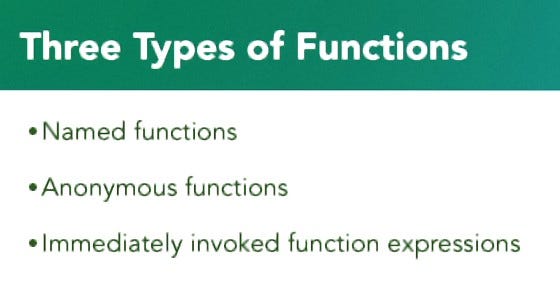
- Named Function : decleration Function
Function nameOFfunction (Parameters){
do code
return otput;
}
invoke the function by its name
- Anonymous Function : expression Function
let nameOf function = function(parameters){
do coding
return output;
}
invoke the function by its name